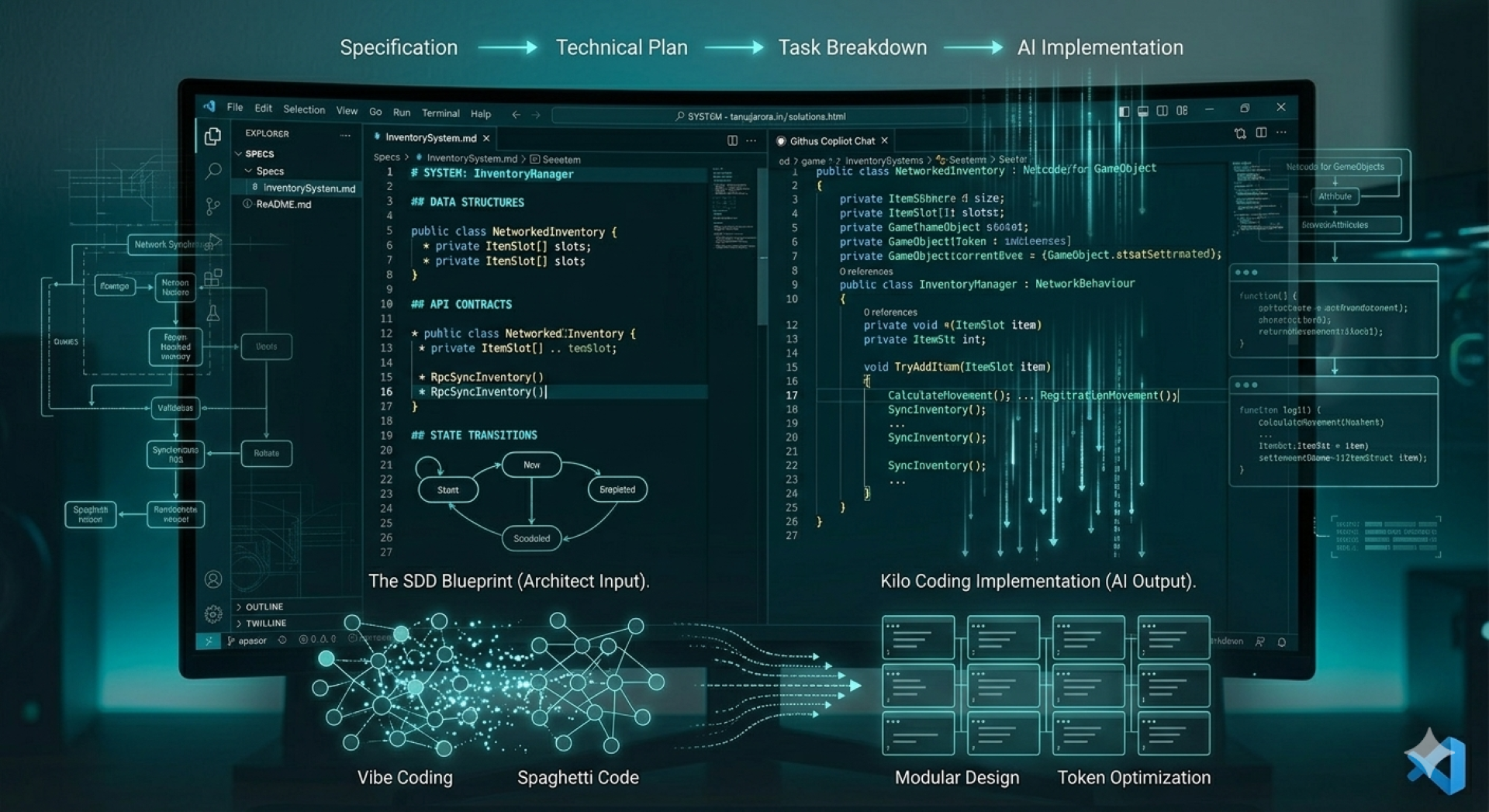
1. Introduction & Source Code

Game development is inherently complex. Between managing intricate state machines, physics loops, and multiplayer synchronization, maintaining a clean architecture is already a massive challenge. Add AI coding assistants into the mix, and that challenge multiplies. While AI can write code at lightning speed, letting it guess your game's architecture based on vague prompts usually results in an unmaintainable mess of "spaghetti code."
Enter Spec-Driven Development (SDD).
SDD is a methodology that shifts the focus from writing raw code to writing rigorous, structured specifications. By creating a clear source of truth before a single line of logic is generated, you empower both yourself and AI agents to build robust, scalable game systems without losing control of your architecture.
In this blog, we are going to explore what SDD is, why it is the secret weapon for modern game developers, and how you can set up a complete SDD workflow right in VS Code to confidently generate thousands of lines of code, a concept known as "kilo coding."
Get the Source Code: Want to see the final setup in action? You can find the complete repository, including example specs and the VS Code workspace configuration, right here: 👉 https://github.com/github/spec-kit
2. What is Spec-Driven Development (SDD)?

Traditionally, software development involves writing code manually, iterating, debugging, and then eventually documenting how it works. When AI coding assistants were first introduced, many developers treated them like an "autocomplete on steroids," allowing the AI to guess the necessary logic based on a few comments or the current file context.
Spec-Driven Development (SDD) completely flips this dynamic.
In SDD, the primary "source of truth" is not the raw codebase; it is a rigorous, structured specification document. The Core Philosophy: Architect First, Generate Second
Instead of jumping straight into a C# or C++ file, you, the senior engineer or architect, expend your engineering effort defining the system in a highly structured format (like Markdown or YAML). This specification is not a vague prompt like "Write a multiplayer inventory system." Instead, it explicitly defines the boundaries of your architecture:
- System Responsibility: Exactly what the system does and, equally importantly, what it does not do.
- Data Structures (Schema): The precise data models, structs, and classes that will handle the data in memory.
- API Contracts: The public methods, interfaces, inputs, and outputs the system must expose to other game systems.
- State Machine Logic: How the system transitions from one state to another (e.g.,
Idle->Equipping->Ready).
3. How AI Fits into SDD
Once this structured specification is finalized, it is fed to an AI coding agent. Because the spec is highly standardized and heavily detailed, the AI does not have to guess your architectural decisions or hallucinate dependencies. It simply executes your plan, generating the actual boilerplate, classes, and implementation logic based only on the spec you provided.
In an SDD model, you elevate your role. You move away from manual syntax typing and become the Architect and Editor of the AI-generated implementation.
4. Why Game Developers Need SDD
While web or app developers might get away with letting AI generate isolated CRUD (Create, Read, Update, Delete) functions on the fly, game development is an entirely different beast.
Games are highly stateful, real-time ecosystems. A single architectural misstep in a game loop or a memory allocation error in an update function can tank your framerate or break deterministic multiplayer synchronization.
Here is exactly why relying on standard "prompting" fails in game dev, and why Spec-Driven Development is the necessary antidote:
1. Taming the "Spaghetti Code" Machine
AI coding assistants are naturally prone to taking the path of least resistance. If you ask an AI to "make the player take damage," it might inject logic directly into your Update() loop, tightly coupling your input system, health variables, and UI updates all in one place. Over time, this creates an unmanageable web of spaghetti code. SDD forces the AI to respect boundaries by declaring exactly which classes handle which logic before generation begins.
2. Complex State Management
Game entities (like an NPC or a boss) rely on complex Finite State Machines (FSMs) or Behavior Trees. Standard AI prompting often loses track of state transitions. By writing a strict specification document, you can explicitly map out valid states and transitions (e.g., ensuring an NPC cannot transition from Dead to Attacking). The AI simply writes the boilerplate for the states you mathematically defined.
3. Multiplayer and Determinism
If you are building networked games using frameworks like Photon Quantum, Mirror, or Netcode, deterministic execution is non-negotiable. You cannot allow an AI to randomly generate non-deterministic logic (like using standard Random instead of a synced seeded RNG). An SDD document allows you to define strict architectural rules, like "All state changes must be handled via RPCs" or "Data structs must be blittable", ensuring the AI writes netcode-safe logic from the start.
4. Protecting the Render Loop
AI doesn't natively understand the performance cost of a Unity GetComponent() call or spawning objects inside a high-frequency loop. By utilizing specs, you can dictate caching strategies and memory pooling requirements upfront, ensuring the generated code respects your performance budget.
5. From "Vibe Coding" to "Kilo Coding"
As AI tools have evolved, two distinct coding styles have emerged in the developer community: "vibe coding" and "kilo coding." Understanding the difference is crucial for modern game development.
The Trap of "Vibe Coding"
"Vibe coding" is the act of interacting with an AI loosely and iteratively. You write a vague prompt like, "Make a script that lets the player dash when pressing shift, and add a cooldown." The AI spits out some code, you paste it in, it throws an error, you ask the AI to fix the error, and you repeat the cycle.
You are coding purely on "vibes" without a grand plan. While this is fun for quick prototypes or game jams, it is a disaster for production. It leads to fragmented logic, tight coupling, and code that no human (and eventually no AI) can safely modify later.
The Power of "Kilo Coding"
"Kilo coding" refers to the ability to confidently generate hundreds or thousands of lines of functional, production-ready code in a single sweep.
You cannot achieve true kilo coding with vague prompts. The only way to safely generate code at this scale is through Spec-Driven Development. When you provide an AI with a comprehensive, airtight specification that outlines the data models, interfaces, and architecture, the AI isn't guessing anymore. It is simply translating your blueprint into syntax.
With SDD, you aren't fighting the AI to fix a 50-line dash script; you are instructing the AI to generate a complete, 2,000-line modular Ability System perfectly aligned with your game's architecture.
6. Token Optimization & AI Context Management
One of the biggest technical hurdles when using AI in game development is managing the "context window", the amount of text the AI can process at one time.
A standard game codebase can easily span hundreds of thousands of lines. If you try to dump your entire Scripts folder into an AI prompt and ask it to add a new feature, you will run into two major problems:
- Token Limits: You will hit the maximum token limit of your AI model.
- Context Dilution (Hallucinations): Even if the AI has a massive context window, feeding it too much irrelevant code dilutes its focus. The AI might start hallucinating connections between your new Inventory system and an unrelated Audio Manager just because they were in the same prompt.
How Specs Solve the Context Problem
Spec-Driven Development acts as the ultimate filter for AI context. Instead of giving the AI a massive, noisy codebase to read, you give it a high-signal, low-noise specification document.
- Higher Precision: A dense, 300-word spec contains exactly the rules, variables, and constraints the AI needs. It leaves no room for the AI to get distracted by unrelated game logic.
- Cost and Speed: Processing a concise spec requires a fraction of the compute tokens compared to analyzing thousands of lines of C# or C++. Your AI responses will generate much faster and cost significantly less if you are using API-based tools.
- Modular Generation: Because specs force you to design modularly, you only ever need to feed the AI the specific interface it is working on, keeping your context window pristine and highly optimized.
7. The SDD Workflow: Specs, Plans, and Tasks
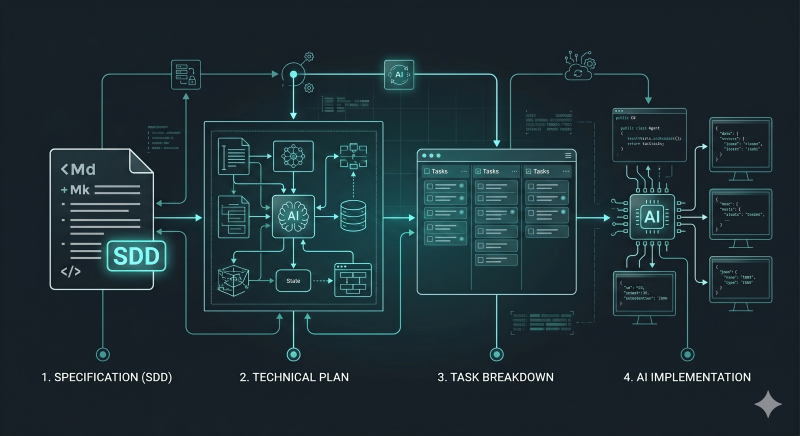
To successfully implement Spec-Driven Development, you need to establish a strict, linear workflow. SDD is not about generating code incrementally; it is about building an architectural foundation and then executing that construction flawlessly.
Here is the standard, optimized workflow for using SDD in game development:
1. The Specification (SDD)
The process always starts with you, the architect, authoring the Spec-Driven Development (SDD) document. This is a highly structured markdown file (or standard text/JSON) that rigorously defines the target system. It is dense, standardized, and contains zero ambiguity.
This spec declares:
- Data structures (structs/classes).
- Interface contracts (public methods/functions).
- State transition logic.
2. The Technical Plan
Once the specification is complete, you pass it to the AI agent. You instruct the agent not to write code yet, but instead to analyze the specification and generate a comprehensive, actionable technical plan.
The AI's generated plan maps out:
- Architecture Flow: How the specified modules interact.
- Logical Breakdown: How complex logic blocks (like state machines) will be structured.
- Dependencies: Any libraries or external systems required.
3. Task Breakdown
From the validated technical plan, the AI (often with human oversight) automatically generates a granular task list. Every function or class defined in the specification is broken down into small, executable work items.
Instead of: "Write the inventory system."
You get: "Implement the AddItem method in InventoryManager.cs following the data contract defined in the spec."
4. AI Implementation (Generation)
This is the final execution step. The AI agent takes the granular tasks one by one and generates the actual implementation logic. Because the tasks are based on a verified plan derived from an airtight specification, the AI generates contextually precise, bug-free, and modular code without hallucinations.
In this workflow, your primary contribution is Step 1: the creation of the architectural specification, ensuring that your game's systems are built upon a foundation of robust engineering from day one.
8. Example: Specifying a Game System
To truly understand why SDD is so effective, you need to see a specification in action.
Let’s imagine we are building a standard networked Inventory System. Instead of opening a C# script and asking an AI to "write an inventory," we first author our .md (Markdown) spec file.
Here is a simplified example of what a high-quality SDD document looks like for an AI agent:
# SYSTEM: Multiplayer Inventory Component

## 1. Responsibility
Handles the storage, addition, and removal of items for a single player character.
MUST be server-authoritative. Clients can only request changes via RPCs.

## 2. Data Structures
Define a struct for the item data to ensure memory efficiency.

- ItemSlot (Struct)
  - string ItemID
  - int Quantity
  - int MaxStackSize

## 3. Interfaces & API Contracts
The component must expose the following public methods:

- bool TryAddItem(string itemID, int amount)
  - Logic: Checks if there is space or an existing stack. Returns true if successful, false if inventory is full.
- bool TryRemoveItem(string itemID, int amount)
  - Logic: Removes the specified amount. Returns false if the player doesn't have enough.
- void RpcSyncInventory(ItemSlot[] currentSlots)
  - Logic: Server-to-Client RPC to update the local UI.

## 4. Constraints & Rules
- Do NOT use LINQ for inventory searches (performance requirement in the game loop).
- Use a standard array `ItemSlot[] slots` with a fixed size of 32, initialized on Awake().
- No UI logic should be present in this class; use C# Events (Action) to broadcast inventory changes to the UI manager.
Why This Works
If you feed the above specification to an AI like Claude or GitHub Copilot, it cannot fail. You have eliminated the AI's ability to hallucinate. It knows exactly what data types to use, the exact names of your methods, the network architecture constraints (server-authoritative), and even the performance rules (no LINQ).
The AI will instantly generate the perfect InventoryComponent.cs class. From there, you review the code, approve it, and move on to specifying your next game system.
9. Setting Up SDD in VS Code
Now that we understand the theory and the workflow, let’s look at how to actually execute Spec-Driven Development in your daily IDE environment. Visual Studio Code (and its AI-native forks like Cursor) is arguably the best environment for this workflow.
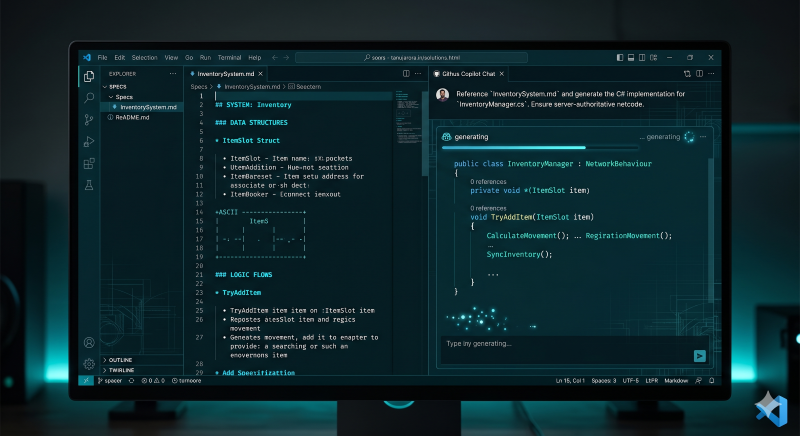
Here is the step-by-step guide to configuring your workspace for "Kilo Coding":
Step 1: Organize Your Project Structure
Your specifications need to live alongside your codebase so they can be easily tracked in version control (Git) and easily referenced by your AI tools. Create a dedicated folder in your Unity/Unreal project root:
-
📁 /ProjectRoot-
📁 /Assets(or Source) -
📁 /Specs👈 This is your SDD control center.📄 InventorySystem.md📄 PlayerMovement.md
-
Step 2: Equip the Right AI Tools
You need an AI assistant that can read files directly from your workspace. Standard web-based ChatGPT won't cut it here because of the constant copy-pasting.
- GitHub Copilot Chat: Excellent for referencing specific markdown files using the
#filecommand. - Cursor IDE: A fork of VS Code built entirely around AI. Its Composer feature is arguably the best tool currently available for reading specs and generating multi-file implementations.
- Agentic Extensions: Tools like Cline (formerly RooCode) run inside VS Code and can read your specs, create technical plans, and execute file creation autonomously.
Step 3: The Split-Screen Workflow
The physical layout of your IDE is important for your mental model.
- Open your specification (
.md) file and snap it to the Left Pane. You are the architect; this is your domain. - Open your AI Chat window (or the target
.cs/.cppfile) and snap it to the Right Pane. This is the builder's domain.
Step 4: The Execution Prompt
When your spec is ready, you don't need a massive, complex prompt. Your prompt should simply direct the AI to your source of truth.
If using Copilot or Cursor, your prompt looks like this:
"Please read
#file:InventorySystem.md. Generate a technical plan for this system. Once I approve the plan, generate the complete C# implementation and place it in/Assets/Scripts/Inventory/."
Because the AI is constrained entirely by the Markdown file, it will output highly predictable, structurally sound code that drops right into your game loop perfectly.
10. Common Pitfalls to Avoid
Adopting Spec-Driven Development is a mindset shift. While the workflow is incredibly powerful, there are a few common traps developers fall into when first making the transition. To keep your architecture clean, avoid these pitfalls:
- Writing "Vibe" Specs: If your Markdown file just says, "Make a player controller with jump and dash," you are still just vibe coding. A true spec must define the interface, the data, and the constraints. If your spec lacks technical boundaries, the AI will still hallucinate the architecture.
- Breaking the Source of Truth: This is the most dangerous pitfall. If the AI generates your system, and you later go into the C# script to manually tweak a variable or add a function without updating the Markdown spec, the spec is no longer the source of truth. Future AI generations will overwrite your manual changes or become confused. Always update the spec first.
- Skipping the Planning Phase: Rushing straight from Spec to Implementation often leads to structural errors. Always force the AI to write out a "Technical Plan" or "Task List" first. Reviewing this plan acts as a sanity check before you burn tokens generating thousands of lines of code.
- Specifying Too Much at Once: Don't try to write a single spec for your entire RPG. Break your game down into modular components (e.g.,
InventorySystem.md,DialogueManager.md,NetworkState.md). Modular specs lead to modular, decoupled code.
11. Conclusion
AI coding assistants have forever changed game development, but raw speed is useless if it results in a fragile, unmaintainable codebase.
By transitioning from reactive "vibe coding" to Spec-Driven Development, you reclaim your role as an architect. You leverage the AI for what it does best, rapidly writing syntax and boilerplate, while keeping strict control over your game's state machines, network constraints, and performance budgets. SDD allows you to confidently generate thousands of lines of code ("kilo coding") knowing that every single line is anchored to a rigorous, human-verified blueprint.
The next time you sit down to build a feature, resist the urge to immediately open a C# script. Open a Markdown file instead. Plan the architecture, define the boundaries, and watch how cleanly the AI brings your vision to life.